
Funny Exchange App – How to Register, Login & Access Your Account
The Funny Exchange App is designed to provide users with a convenient way to access platform features through a mobile-friendly interface. Whether you are a new visitor or an existing user, understanding the Funny Exchange App registration and login process can help you navigate your account more easily. From creating an account to accessing the login page, a few simple steps can make the overall experience more convenient.
In this guide, we will explain how to register on Funny Exchange, complete the Funny Exchange App login process, access your account, understand basic security practices, and troubleshoot common login issues. This article also covers important information about Funny Exchange mobile access and account management.
What Is the Funny Exchange App?
The Funny Exchange App is a mobile-access platform that allows users to explore available features through a smartphone or compatible device. Its interface is designed to make navigation, account access, and basic platform functions easier.
Users searching for Funny Exchange App Download, Funny Exchange Login, or Funny Exchange Registration should first verify that they are visiting the correct and authorized website. Platform availability, supported devices, and features may vary depending on the official service.
Before creating an account, review the platform’s terms, privacy policy, eligibility requirements, and applicable local laws.
How to Register on Funny Exchange App
Creating an account is generally the first step for new users who want to access platform services. The Funny Exchange registration process may require basic information and mobile verification.
Follow these general steps:
Visit the verified Funny Exchange website using your browser.
Find the Register or Sign Up option on the homepage.
Open the registration form.
Enter the information requested by the platform.
Provide a valid mobile number or email address if required.
Complete any verification process.
Read and accept the applicable terms and conditions.
Submit the form and follow the instructions displayed on the screen.
Once registration is approved, you may receive confirmation through the contact method provided during signup.
Important: Only provide personal information through a verified website. Never share your password or one-time verification code with another person.
Funny Exchange Login – How to Access Your Account
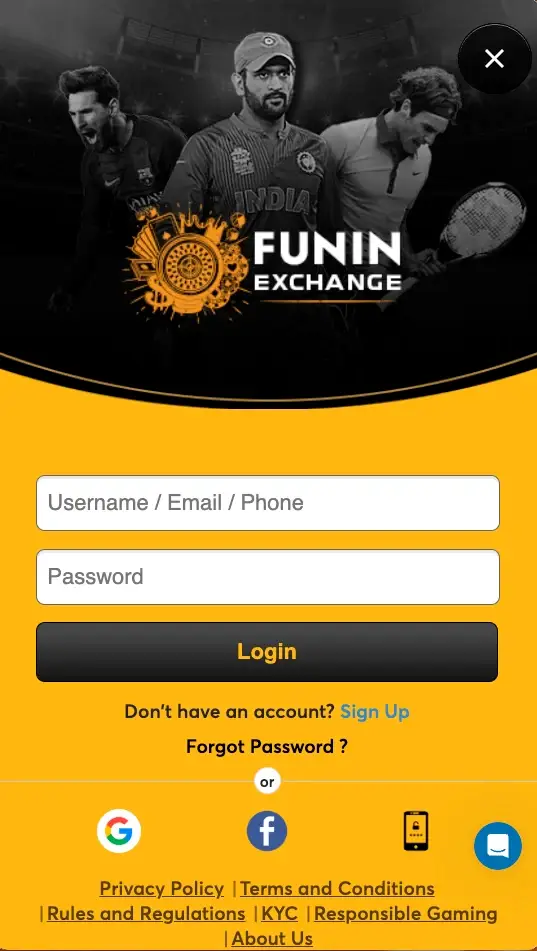
The Funny Exchange Login process allows registered users to access their accounts. Before logging in, make sure you have your correct login credentials and a stable internet connection.
Here is a general Funny Exchange login guide:
Open the verified Funny Exchange website or supported application.
Locate the Login option.
Enter your registered username, mobile number, or other required login ID.
Type your account password.
Complete additional verification if requested.
Select the Login button.
Wait for the account dashboard to load.
After successful verification, you should be able to access the features available to your account.
If the Funny Exchange App Login page does not load, refresh the website or check your internet connection before trying again.
How to Access Funny Exchange on Mobile
Mobile accessibility is an important consideration for people who prefer using their smartphones. Depending on the official platform’s supported options, users may be able to access Funny Exchange through a mobile browser or an authorized Android application.
For a smoother mobile experience, consider these steps:
Use an updated mobile browser.
Maintain a stable internet connection.
Keep your device operating system updated.
Avoid installing applications from unknown websites.
Check application permissions before installation.
Use a secure screen lock on your smartphone.
Before searching for Funny Exchange App Download or Funny Exchange APK Download, confirm that an official application is actually available. Avoid unofficial APK files because they may contain harmful software or compromise personal information.
Funny Exchange Account Features and Navigation
A user-friendly interface can make account navigation more convenient. Depending on the features officially offered by the platform, the dashboard may provide access to different account sections.
Some common account management options include:
1. Account Information: Users may be able to review basic profile details and update permitted information.
2. Login Settings: Account settings may include password management and available verification options.
3. Support Section: Users can look for assistance with account access or technical questions.
4. Notifications: If supported, notifications may provide account-related updates and service announcements.
5. Mobile Navigation: A responsive interface can make it easier to browse different sections using a smartphone.
Actual features should always be confirmed through the official platform.
Funny Exchange App Security and Privacy Protection
Account security should be a priority whenever you use an online platform. Protecting your login credentials and personal information can help reduce the risk of unauthorized account access.
Follow these basic security recommendations:
Create a strong and unique password.
Never share your login credentials.
Do not disclose OTPs or verification codes.
Avoid logging in through suspicious links.
Do not save passwords on shared devices.
Log out after using a public computer.
Review the privacy policy before submitting personal information.
Also, avoid sharing sensitive account details through unofficial social media pages or messaging groups.
Common Funny Exchange Login Problems and Solutions
Sometimes users may experience difficulties while accessing their accounts. These problems can happen because of incorrect credentials, internet connectivity, browser settings, or temporary technical issues.
Here are some common Funny Exchange login problems and possible solutions.
Incorrect Username or Password
Check your login details carefully. Make sure there are no typing errors, unnecessary spaces, or incorrect characters.
Forgotten Password
If the platform provides a password recovery option, use the official recovery process. Follow the verification instructions to reset your password securely.
Website Not Opening
Check your internet connection and try refreshing the page. You can also try another updated browser.
OTP Not Received
Verify that your registered mobile number or email address is correct. Check your network connection and wait before requesting another verification code.
Application Installation Issues
If an authorized Funny Exchange application is available, check your device compatibility and the application’s official installation instructions.
If the problem continues, contact the platform through its verified customer support channel.
Tips for a Better Funny Exchange App Experience
A few simple practices can help make mobile browsing and account access more convenient.
Always use the verified Funny Exchange website.
Keep your browser and device updated.
Avoid downloading unknown application files.
Use secure internet connections.
Read the platform’s terms and privacy policy.
Contact official support when account-related problems occur.
Set reasonable limits and avoid treating online games or wagering as a source of income.
Users should also check age restrictions and local regulations before accessing any services involving real-money activities.
Funny Exchange Customer Support and Assistance
Customer support can be useful when users face registration, login, verification, or technical problems. If you cannot access your Funny Exchange account, look for the official support details published on the verified platform.
Before contacting support, prepare a clear description of the issue. You may also mention the type of device and browser you are using.
Never send your password, OTP, or complete payment credentials to anyone claiming to provide account assistance.
Conclusion
The Funny Exchange App registration and login process can be straightforward when users follow the correct instructions and access the verified platform. New users should understand the registration requirements, while existing users should keep their login credentials secure.
Whether you are searching for Funny Exchange App Download, Funny Exchange Login, Funny Exchange Registration, or mobile account access, always prioritize website authenticity, privacy protection, and responsible usage. Check the official platform for the latest information about supported devices, application availability, and account services.
Funny Exchange App (FAQs)
1. How can I register on Funny Exchange?
Visit the verified website, select the registration option, enter the requested information, and complete any required verification.
2. How do I log in to Funny Exchange?
Open the verified login page, enter your registered credentials, and follow the on-screen verification instructions.
3. Is Funny Exchange available on mobile devices?
Mobile access depends on the platform’s supported options. Users should check the verified website for compatibility information.
4. Can I download Funny Exchange APK?
Check whether an authorized Android application is available through the official platform. Avoid downloading APK files from unknown sources.
5. What should I do if I forget my Funny Exchange password?
Use the official password recovery option, if available, and follow the account verification instructions.
6. Why is my Funny Exchange login not working?
Possible reasons include incorrect credentials, internet problems, browser issues, or temporary service interruptions.
7. Is registration required to access Funny Exchange?
Some platform features may require an account. Check the official website for its registration and access requirements.